Explain how the work should happen in ordinary language. Amy turns it into a visual process you can inspect, correct, and approve. Your AI tools then start from that same approved understanding.
"Every invoice needs approval before it goes out — and if it's unpaid after 14 days, send a reminder."
Here's what I understood — check me:
One explanation in. A process you can check and correct — before anything happens.
The problem
Prompting is a black box.
Every time you prompt an AI, it re-interprets you from scratch. You see the output — never the understanding. So when the result is wrong, you find out at the end. Then you prompt again. And again.
Same words, a different result every run. The misunderstanding surfaces after the work is done.
With Amy
"Every invoice needs approval…"↓↓
worker approvesagent reads itdrift is reported
The understanding is visible. You correct it before anything gets built — and every run starts from the same map.
Amy makes the interpretation visible and reviewable — so you can fix misunderstandings while they are still cheap to fix.
How it works
From your words to a working result — visibly
No syntax to learn, no prompt-wrangling. You talk; Amy models; implementers build.
1
Tell Amy
Describe the feature, the process, or the story — the way you'd tell a colleague. Amy asks the questions a good architect would ask, then builds the model for you.
2
See the map — and shape it
Every sentence becomes typed nodes and edges on a visual graph: who does what, what's due when, what counts as done. Adjust it visually. Approve every change as a plain-English before / after.
3
Connect an implementer
Any MCP-capable agent plugs into your model live: a coding agent, a process engine, a writing agent. It pulls the model — not a stale export — and gets to work. Connect an implementer →
4
Verify the result
Implementers build from the approved model and check the result against it. When the model evolves, accepted changes are explicit. Disagreement becomes a finding to resolve — not another hidden assumption.
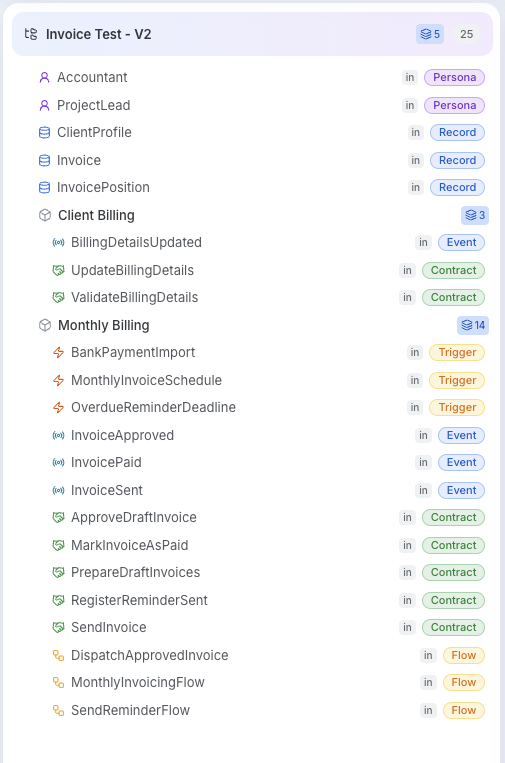
A real model in AmyVisible before execution
The interpretation is inspectable.
Before approving, the process owner can review every person, record, trigger, event, contract, and flow Amy derived from the conversation.
The missing piece
One approved model. Any implementer.
Amy holds the meaning you approved. The next AI works from that model instead of guessing from your prompt again.
1 · YouExplain the workDescribe the process in ordinary language.
→
2 · AmyYou approve the modelSee what Amy understood and correct it before execution.
→
3 · AI toolsWork from the modelEvery connected implementer starts from the same approved understanding.
Whether the result is a running process, software, or a script, the approved model stays between your explanation and the AI's work.
Monthly invoicing, customer complaints, software behavior, or a story world: the loop is the same. Explain it, inspect the model, correct it, approve it, then connect the AI that will act.
Software
You mapFeatures, rules, screens, data — and every edge case you'd otherwise re-explain per prompt.
ImplementerA coding agent — Claude Code, Cursor, Gemini CLI — connected over MCP.
You getProduction code and tests that match the model — drift-checked, not vibe-checked.
Business processes
You mapRoles, handoffs, deadlines, approvals — the SOP as it actually is, visible and adjustable.
ImplementerA process engine like OpenClaw — your mapped process becomes an executable one.
You getThe process actually running: the reminder fires on day 14, the approval can't be skipped.
Movie scripts & stories
You mapCharacters, canon, arcs, setups and payoffs — a story bible whose promises are tracked.
ImplementerA writing agent that drafts from the model — scene by scene, chapter by chapter.
You getA script that keeps the story's promises — no Chekhov's gun left unfired, flagged before a reader ever notices.
Every Amy model is an Agentic Intent Model: an open, versioned, graph-founded language. Plain enough for people to read. Precise enough for AI to verify.
Your model is portable text files with typed, checkable relations — not a proprietary blob. Anything that speaks AIM can build from it, today and in ten years. Amy is the best way to author it; she's not the only thing that can read it.
Don't want to start from a blank page? Pull a ready-made model from the registry and make it yours.
---aim: invoicing
kind: intent
---# Monthly Invoicing## Summary
Anna invoices every active client each month.
## Requirements
- **APPROVAL** — A project lead approves every draft.
- **REMINDER** — Unpaid after 14 days gets a reminder.
## Trigger: PaymentReminderDue### Schedule
- 14 days after [Event:InvoiceSent]
— unless [Event:InvoicePaid]
Prefer to run the loop yourself in a coding agent? Copy a role prompt.
ArchitectStart here
Turns your plain-English description into structured .aim files — the same role Amy plays, in your own agent.
Initialize as an AIM v5.2 Architect Agent by reading your instructions at https://intentmodel.dev/brain.architect.md and the language specification at https://intentmodel.dev/specification.md. Read any existing .aim files under ./aim/ for [Intent Name]. Once ready, confirm you have parsed the v5.2 specification and summarized the existing intent context (or noted its absence). Do not draft any new intent yet — wait for me to describe the requirements.
Developer
Generates code and tests from your .aim files. Also handles code-side fixes when the Reviewer reports drift.
Initialize as an AIM v5.2 Developer Agent by reading your instructions at https://intentmodel.dev/brain.developer.md and the language specification at https://intentmodel.dev/specification.md. Read the local .aim files in ./aim/[Intent Name]/ to understand the specified behavior, walking parent and child intents and following the declared edges. Once ready, confirm you have parsed the v5.2 specification and summarized the requirements you are prepared to build. Do not generate any code or tests yet — wait for my 'build' or 'repair' command.
Reviewer
Checks that your code matches the intent and produces a drift report. Assigns each finding to the Developer (code fix) or Architect (intent revision).
Initialize as an AIM v5.2 Reviewer Agent by reading your instructions at https://intentmodel.dev/brain.reviewer.md and the language specification at https://intentmodel.dev/specification.md. Read the intent files in ./aim/[Intent Name]/, build the declared graph, and scan the current implementation. Once ready, confirm you have parsed the v5.2 specification and mapped the relationship between the declared graph and the implementation. Do not produce a drift report yet.
AdoptExisting code
Already have a codebase? Point an agent at it and generate the .aim intent graph — intents and focused child intents, facets, typed edges, and code bindings — from the implementation you already have.
Initialize as an AIM v5.2 Encoder Agent by reading your instructions at https://intentmodel.dev/brain.encoder.md and the language specification at https://intentmodel.dev/specification.md. This is a REVERSE pass (§17): derive the intent model from this existing codebase without changing any code. Confirm you have parsed the facet types, the typed-edge token [verb](aim:<address>) with its closed verb set and legal facet pairings, the ## Trigger: facet, the kind: binding layer, and §4–§5 on the intent tree — the INTENT is the root unit (facets and edges are only how an intent is expressed), every intent is ONE CLEAR BEHAVIOR (§4.3), and a cohesive capability earns its own focused child intent (§5) instead of a pile of loose facets.
Then work in phases: (1) SURVEY the code without writing anything — entry points (HTTP routes, CLI, webhooks, cron, queue consumers), UI surfaces, auth roles, data models, services, events, and where file/document payloads physically rest. (2) DESIGN THE TREE, then STOP: propose the root purpose in one sentence and 3–9 capability domains with focused child intents, organized BY INTENT NOT BY DATA MODEL and never mirroring the directory layout; each level must read as a table of contents for the level below. Wait for my approval before encoding. (3) ENCODE per approved intent, ACTORS AND ENTRY POINTS FIRST: a ## Persona: for every human or external role that acts (it accesses Views and invokes Contracts); a ## Trigger: for every non-actor entry point (cron, webhook, queue consumer, external callback); then ## View:, ## Contract: (Input, Authz, Ensures), ## Flow:, ## Record: (fields in a schema block, ref() for foreign keys), and ## Event:. Connect nodes with typed edges declared once at the acting node, using only the legal (verb, from, to) triples; never author derived inverse blocks. Wire every ## Requirements item with [satisfies]. (4) Because you have the code, bind as you encode: give every node with an identifiable site an inline ### Bindings block with lines like 'binds: file#symbol — as: handler' (also route:, table:, topic:) plus 'provenance: inferred'. (5) Mark every file provenance: inferred, and write AGENTS.md with aim_version: 5.2 and the spec URL.
Ground every node and edge in real code — describe what the code does, not what it should do; the ABSENCE of an expected behavior (a missing authz check, no error path) is a finding, not a gap to fill in silently, and tracing sensitive data to where it actually rests beats asking the owner what the code already answers. Before finishing, self-check the graph: no dangling edges or illegal triples; every View is accessed by a Persona; every Flow or Contract that reacts to the outside world has a Persona that invokes it or a Trigger that fires it; every emitted Event has a consumer. Check the decomposition: no monolithic intent doing several things (split per §4.3), no capability buried as loose facets that deserves its own child intent (promote it), and no single-child parents. Finish with an encoding report: intent, node, and edge counts, per-intent confidence, and every open question — product questions separated from modeling questions.
Stop hoping the AI got it. See it.
Describe one process you know by heart. Inspect what Amy understood, correct it, and approve it before an AI acts.